

Manage Your Windows 10 Updates the Smart Way

Manage Your Windows 10 Updates the Smart Way

It may be irritating at times to find constant update notifications, but updates are essential to ensure your system’s smooth performance and functions. Without managing the said updates, you would find yourself in trouble for having a very slow system performance during your remote work shift. The worst scenario is that you would stumble upon automatic updates, which take time to finish. This could lead to late reporting, missed deadlines, delayed completion of tasks, and poor productivity among others.

Windows updates include security updates and are the worst possible errors – as they may be exploited by malware or hackers. Other updates address other bugs and issues in Windows. Although these are not responsible for security vulnerabilities, these might impact the stability of your Operating System. Windows updates also sometimes come with new features, while patching some known issues.

Oftentimes, these Windows updates, if not set properly, automatically update itself via shutdown or automatic restart without warning. Therefore, these halt system usage or even interrupt the user’s time since it takes roughly 10 to 20 minutes for some updates to finish installation.

If you want to somehow control how these updates behave, try following the steps below:

Make sure your PC is always updated.

To do this, go to Settings > Update & Security > Windows Update. You can see in this section if there are updates available or are currently pending.
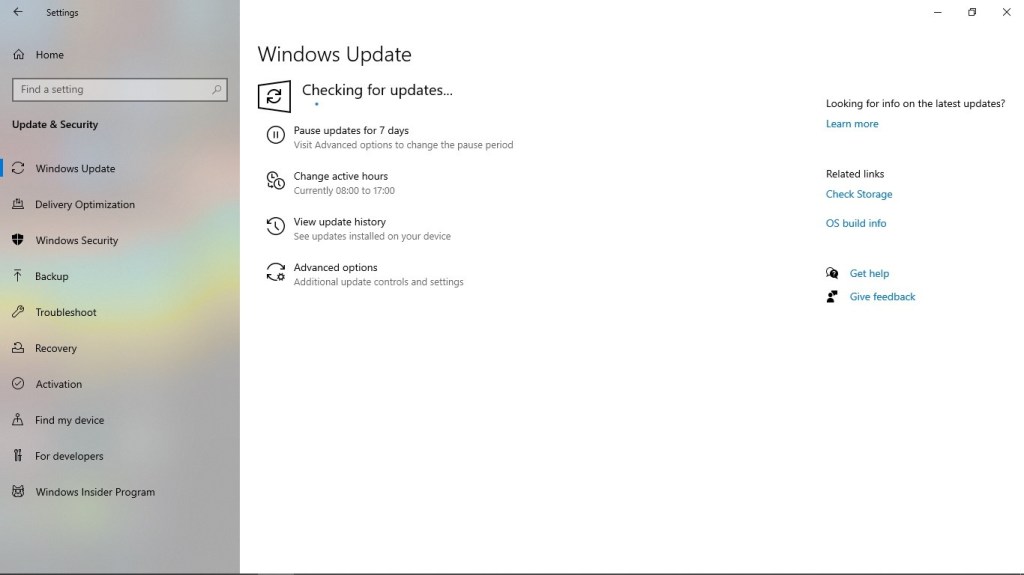
Set active times to prevent an update from installing and restarting your PC automatically while the system is in peak usage.

To do this, click on Change active hours.
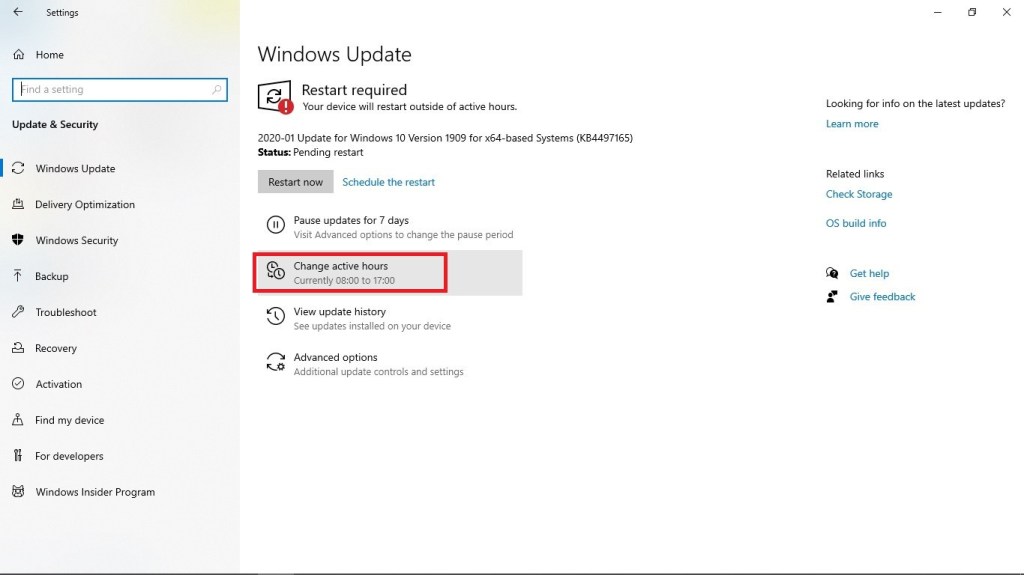
Once done, set your convenient active hours. Keep in mind that these hours are the hours that you and your system are not to be disturbed.

Set additional customization of updates.

Go to Advanced options.
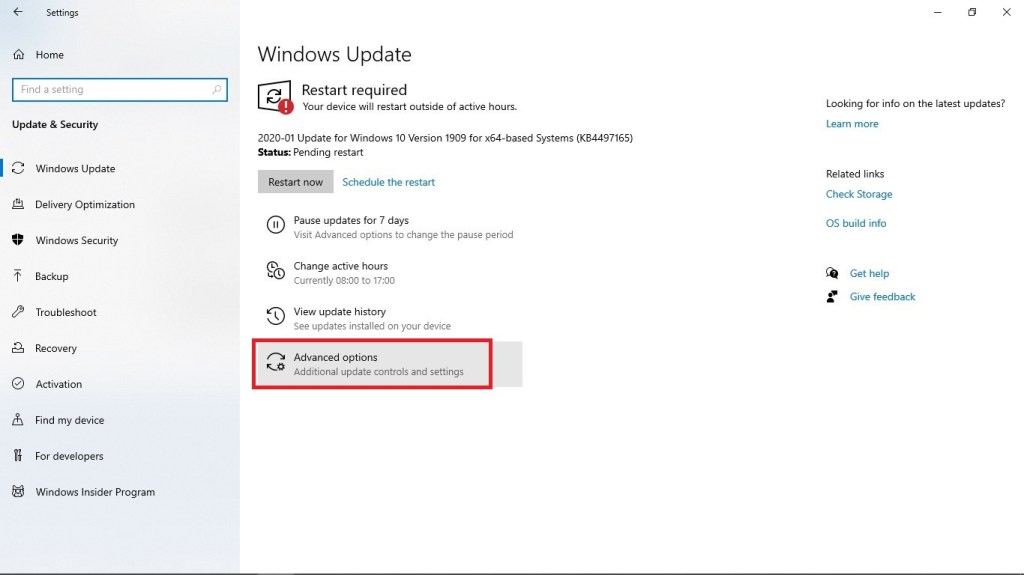
In Advanced options, turn off Restart this device as soon as possible when a restart is required to install an update. Windows will display a notice before the restart, and the device must be on and plugged in., to gain control on when to restart your system.

Schedule a restart at a later time. Normally, when an update is completed, you would see a Restart required prompt.

Just click on Schedule the restart.

Enable Schedule a time and set your desired restart time.

Simply follow the aforementioned steps and you would no longer have to worry about constant update notifications or disrupting automatic updates. Be reminded that the condition of your workspace determines your remote work experience and performance. Hence, be sure to keep it managed effectively.

Why You Should Set Up a Home Office

There are lots of ways to feel like an office-based employee while working as a virtual assistant. You could start by setting up an area in your home that would serve as your office. In truth, this is a strategy for newbies to cope with their adjustment from being an office staff to a home-based worker easily. Furthermore, there are numerous benefits to consider when it comes to doing so. To give you insights on this matter right away, check out these points:

Maximum Productivity. Did you know that many could attest that setting up a specific area at home as an office helps increase productivity? According to most remote workers, there is this lack of distractions, particularly if you stop placing your computer near the living room or in the bedroom itself. It will appear like you are isolating yourself while working so that your concentration will not be divided.

If your loved ones are often within your sight, you would likely have this uncontrollable urge to check on them once in a while. In contrary, if you are alone in a certain area with minimal disturbance, you would have every reason to make the most out of your time to work.

This is also a way to separate your personal space from your professional one.

Staying Organized. Having a home office means every document or file related to your work could be found in that area. This is a smart way to stay organized. Regardless of how urgent the requirement of your client is, there will no longer be delays since you already know where to go.

Aside from your computer, your home office could also be equipped with a file cabinet or bookshelf, where all your needed materials or references could be found.

Improved Speed in Task Execution. If you could set up an office where all of your necessitated office tools and devices could be found, you would lessen the time to execute certain tasks. For instance, instead of running from one room to another simply to make a call, you could set up a telephone near your desk as well. This goes the same if you are talking about printers, scanners, fax, etc.

Professional Environment for Client Coordination. Most clients, who hire virtual assistants, prefer employees whom they can communicate with minus the disorder and homey feel. This means whenever a call (either voice or video) is initiated, they will not have issues with background noises or cluttered area to see in their monitor. If you would set up a dedicated office, you would no longer have to tell the people around you to shush simply because you are taking a call.

Avoidance of Poor Lighting. If you are used to positioning yourself anywhere at home when working, this could be a risk for your eyes. Without proper lighting, you will likely have an eye strain.

However, if you would find a way to set up a home office, you could decide carefully where to place your computer monitor. This will help you work more safely and longer.

With the points provided above, you are probably highly convinced that now is the right time to start setting up your home office.

Start enjoying your home-based lifestyle more!

Communication: A Key to Effective Virtual Work (Client’s Perspective)

Previously, we have discussed how important communication is when you are a virtual worker. Apparently, without it, you will not be able to survive the online industry at all, for you will not just waste a lot of job opportunities. In truth, you will also fail to build a reputation for yourself as a reliable home-based employee.

Now, it is not just about the virtual worker itself, or even if we are talking about a virtual assistant. Take note that communication requires a two-way relationship. Thus, even the employer or a virtual worker’s client has the obligation to maintain good communication.

There are so many instances that a client-employee relationship ends due to failure in effective communication. However, one should not deduce that it is only about the worker. Remember, as mentioned above, it is a two-way requirement. Thus, there are certainly cases that communication fails on the part of the client.

To give you proofs, given below are common situations:

Client fails to provide a complete picture of what he or she wants to be done. This is common during the hiring process of virtual workers. There are times that clients do not provide a complete list of requirements. As a result, they are incapable of finding a good talent for their operations or a simple project.

Although they may find someone despite the vague job description, in the end, this will cause a loophole to develop. It is either the employee will give up for he or she is being blamed for an incorrect output despite the fact it has been the wrongdoing of the client in the first place – not explaining things enough.

Be reminded that if you are a client, you should be as specific as possible in elaborating your needs for a virtual worker. You cannot just say, “I need a good web developer.” There are various programming languages and platforms that such a person could be proficient in. Also, for certain, you are in need of a specific web development skill.

One good example is, you actually need a WordPress expert. If you do not indicate this, you may end up with an inexperienced web developer, who will be going through a lot of practice first before knowing every nook of WordPress.

Client does not even consider to touch base with his or her virtual worker. Take note that work is not all about sending a task and expecting it to be carried out. You should also develop a good relationship with your employee by maintaining a regular communication with him or her.

You are not obligated to actually connect with them every now and then.  The only thing is, you should at least check if he or she is doing well with his or her work, or confirm if there are no issues on their end.

This is not all about being compassionate about your people. Instead, it is about ensuring that everything is on track.

There are times that virtual workers tend to assume (which is entirely wrong, but you cannot blame them all the time), especially when their clients are not reachable at all times or they do not even give the hint that their employees could get their assistance. This is regardless if they will respond or not right away.

Client does not provide a straightforward feedback. You should know that virtual workers are aware that their work could be criticized for their own benefit. It is not solely about telling that something is done incorrectly and your employee should find the mishap himself or herself.

As much as possible, use communication to explain everything that has gone wrong with the output. Provide constructive criticism. This is not a complete waste of time, for it will provide you advantages in the long run. The more you give clearer feedback, the more your virtual workers would be able to identify your style, needs, and wants.

Client provides limited communication leeway for his or her virtual worker. This may be trivial for some, but it is totally helpful. As a client, you should not only provide your virtual worker one communication platform to speak with one another. You should at least provide two. A good example is providing them tasks via e-mail so that you could write everything down effectively and assisting them via a messaging platform of your choice.

Some make a mistake by relying on e-mail alone. As a result, their virtual workers do not get immediate responses or just replies to their inquiries, delaying whatever has to be carried out. Furthermore, e-mails could stack with one another, and admit it or not, clients are mostly not frequent visitors of their inboxes.

Thus, if you really aim to assist your virtual worker to make things work, agree on another communication platform. Well, you got a lot of options around. You got Skype, Messenger, Viber, WhatsApp, Zoom, Slack, etc.

The aforementioned situations are only a few of many instances that could prove communication does fail on the client’s end, too.

Once you have established a good communication with your virtual workers, there is no doubt that you could maximize their abilities for your own benefit or your business’.

Why Hire a Virtual Assistant

Why Hire a Virtual Assistant


With the rise of technology, there is no doubt that soon enough, even your workforce will be composed of people who are carrying out their tasks from home.

In truth, did you know that 69% of large companies (composed of more than 501 employees) actually allow their employees to work remotely? This is based on uSamp’s recent study on the productivity or disruptiveness of the virtual office place. By implication, you can say that more and more firms are now discovering the advantages of having virtual staff.

One of the most commonly outsourced virtual workers is termed as a Virtual Assistant. Probably, you have come across this job title and possibly disregarded it. Nonetheless, you may have missed a gem that could actually contribute to your business growth.

You will definitely ask why. Then, to be straightforward, provided below are top reasons why you should hire a Virtual Assistant or have such person be part of your team:

You Will Save Cost. This is one of the top reasons why executives, businessmen, and rising entrepreneurs prefer to have a Virtual Assistant rather than an in-house employee. Do you know that in-house staff cost you more? Why? Good answers are the insurance and training.

At present, you can hire a Virtual Assistant and pay by the hour. In other words, you do not have to allot a certain amount of salary every month. There are even VAs who can work for a fewer number of hours when necessitated. Conclusively, you only pay for the work you have required.

Furthermore, there will no longer be office overhead for you to worry about. This is palpable given VAs work from home. No more finding a place for your staff.

You Can Get All Things Done With Just One VA. Virtual Assistants are not constrained to do basic administrative tasks, such as scheduling meeting, managing your e-mails, or answering inquiries from your clients.

They are highly trainable, giving you a chance to let them do even unprecedented tasks when needed. You simply have to explain what they have to do and you are set. All it takes is proper training.

Most VAs are also well experienced in different fields. For instance, there are ones who have background in marketing. With such qualification, you would definitely have no issue having such VA work with you in widening your exposure to your audience.

You Are No Longer Boxed With a Single Schedule. VAs are experienced working at different time zones and anytime possible. They could even be available more than eight hours when negotiated. Since they already have the convenience of working from home, these assistants do not mind working beyond normal full-time employee’s hours.

You Secure Your Productivity. Since you can already let go of your administrative tasks, which are often routine and time-consuming, you would definitely find a lot of time to spend on more important activities.

For instance, if there is an activity you definitely want to include in your firm to make it grow, you could now focus on it given a Virtual Assistant can handle your previous tasks.

Since you will also be able to concentrate on the core functions of your business, you will definitely have more means of keeping track of your progress.

You Will Have More Me-Time. There is no doubt that having someone do as much as half of your daily tasks will give you a reason to go home on time. A Virtual Assistant can even work more hours for you in a day, giving you more time to allot for your personal appointments. As indicated above, a VA works by the hour. They could be as flexible as someone who would be available immediately during emergency situations.

The aforementioned reasons for hiring a Virtual Assistant solidify the study also given above. The companies who are already establishing their virtual team have definitely understood the essence of having one.

What about you? Aren’t you interested to make a change?