

Insights

Manage Your Windows 10 Updates the Smart Way

Manage Your Windows 10 Updates the Smart Way

It may be irritating at times to find constant update notifications, but updates are essential to ensure your system’s smooth performance and functions. Without managing the said updates, you would find yourself in trouble for having a very slow system performance during your remote work shift. The worst scenario is that you would stumble upon automatic updates, which take time to finish. This could lead to late reporting, missed deadlines, delayed completion of tasks, and poor productivity among others.

Windows updates include security updates and are the worst possible errors – as they may be exploited by malware or hackers. Other updates address other bugs and issues in Windows. Although these are not responsible for security vulnerabilities, these might impact the stability of your Operating System. Windows updates also sometimes come with new features, while patching some known issues.

Oftentimes, these Windows updates, if not set properly, automatically update itself via shutdown or automatic restart without warning. Therefore, these halt system usage or even interrupt the user’s time since it takes roughly 10 to 20 minutes for some updates to finish installation.

If you want to somehow control how these updates behave, try following the steps below:

Make sure your PC is always updated.

To do this, go to Settings > Update & Security > Windows Update. You can see in this section if there are updates available or are currently pending.
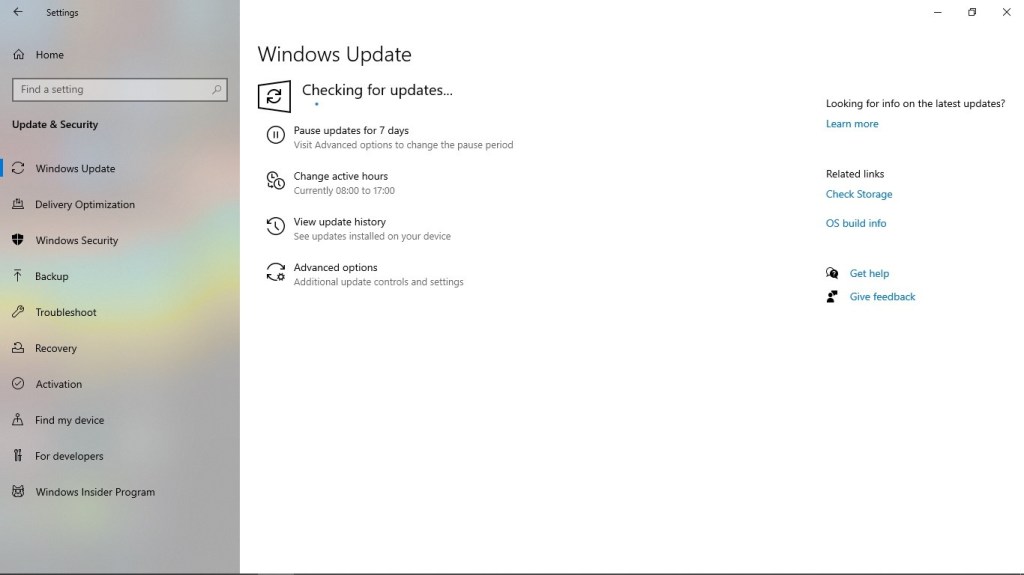
Set active times to prevent an update from installing and restarting your PC automatically while the system is in peak usage.

To do this, click on Change active hours.
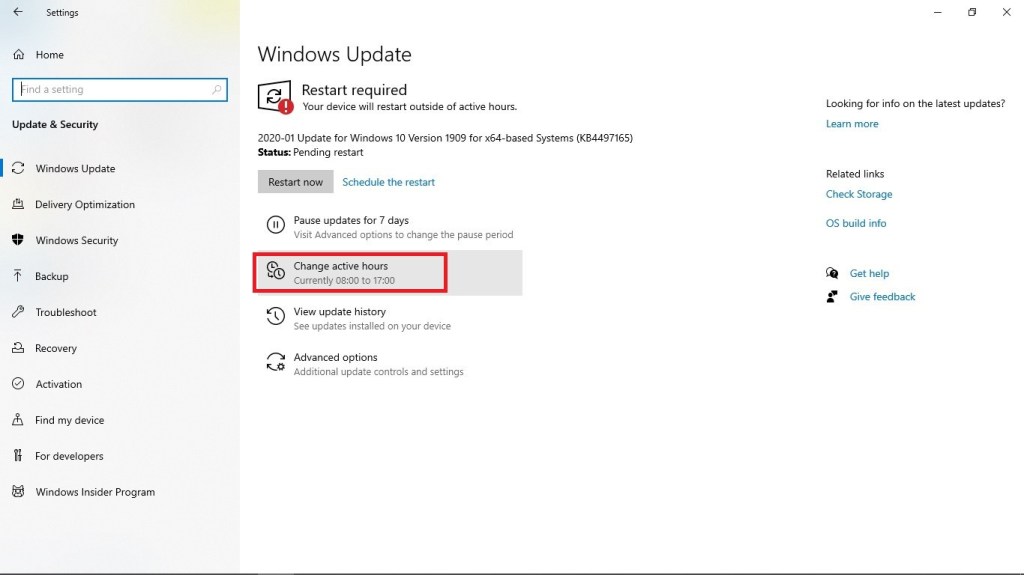
Once done, set your convenient active hours. Keep in mind that these hours are the hours that you and your system are not to be disturbed.

Set additional customization of updates.

Go to Advanced options.
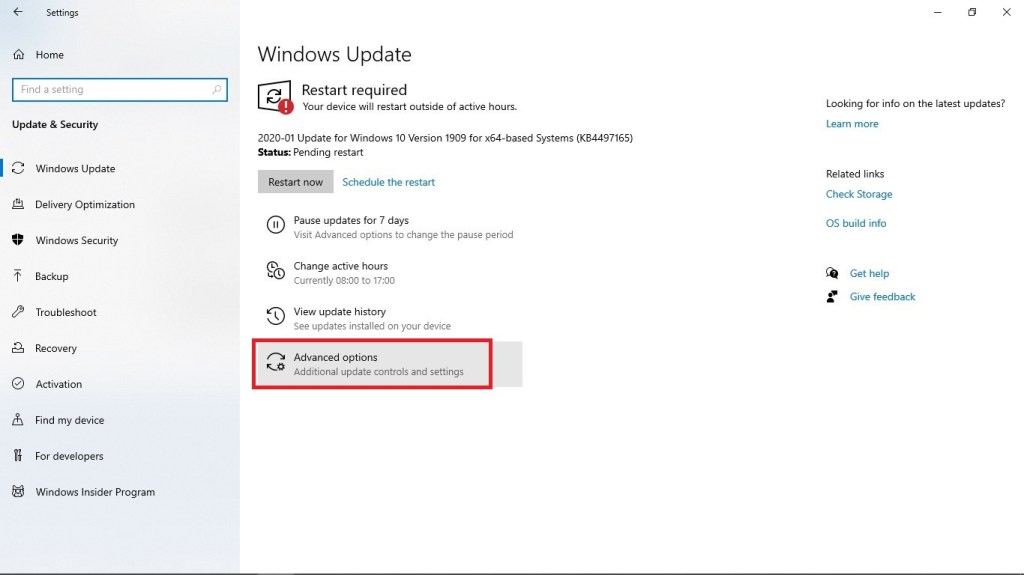
In Advanced options, turn off Restart this device as soon as possible when a restart is required to install an update. Windows will display a notice before the restart, and the device must be on and plugged in., to gain control on when to restart your system.

Schedule a restart at a later time. Normally, when an update is completed, you would see a Restart required prompt.

Just click on Schedule the restart.

Enable Schedule a time and set your desired restart time.

Simply follow the aforementioned steps and you would no longer have to worry about constant update notifications or disrupting automatic updates. Be reminded that the condition of your workspace determines your remote work experience and performance. Hence, be sure to keep it managed effectively.

Understanding: What Does It Mean for a Remote Worker?

Understanding: What Does It Mean for a Remote Worker?

As a remote worker, it is a common practice to simply exchange e-mails or make phone calls with your employer and team members. Some virtual staff even find it odd whenever they face a lot of calls in a position that should not require much of it. For instance, they are required to attend various meetings with suppliers, customers, and partners of their firm among others.

The aforementioned situation may be the reason why there are cases in the remote work industry that call for better understanding among professionals. When you say understanding, it means you have to look at a bigger perspective. It is not simply what you comprehend on the e-mails you have received or hear on the calls you are getting.

One good example is when a co-worker denied to assist you with an urgent project. You have to remember that simply because a message implying rejection was sent to you, the said team member takes things personally. For example, he or she does not simply want to help for you are new in the company. This is not the case most of the time. As mentioned above, you got to look at the situation in a different light. Possibly, your co-worker is caught up in an urgent task, as well, which resulted in him or her not being able to help. Moreover, due to the pressing importance of his or her activity, he or she failed to explain the situation well enough.

This is where understanding would come in. If you practice understanding towards your co-worker, you would never think negatively right away. You will consider other possibilities in the picture. Be reminded that prejudice is not often welcomed in a team, especially a virtual one. With the limitation of simply being able to coordinate via messages or calls, you do not tend to see your team member the whole time. You do not see him or her working on his or her tasks or making haste to meet deadlines. In truth, you will be deluged with tons of possibilities, which would most likely be false instead of true.

The same goes for your employer. Being a company owner or an executive imposes a lot of responsibilities. If he or she fails to assist you or answer your inquiry right away, this does not entail that he or she is showing a lack of care for his or her employees. Take note that this could connote that he or she is attending meetings or working on more important matters in the company.

To gain the said trait of understanding towards your employer and co-workers more effectively, you have to mull over the fact you also go through what they experience while working. It is simply a give-and-take process. If you are in their shoes (having to rush and work on critical activities), letting go of possibilities to support or communicate with your team members due to pending assignments, they would likely understand your situation and give you space, as well.

The most beneficial result when all people in an organization practice understanding is the lack of rift. Harmony would be maintained and there could be a more personal connection to one another. With the build-up of good relationships in a company, there will always be a promising success onward.

Remember, it is all about widening your view of the situation. Let understanding rule your thinking before being assumptive.

Three Basic Tips to Speed Up Web Browsing

Three Basic Tips to Speed Up Web Browsing

The internet is now an integral part of our daily lives. Web browsing has become a daily habit for some and for a virtual assistant, a crucial part of work. Therefore, speeding up a browser is a must.

Apart from software applications that can be accessed offline, clients now utilize web applications to make coordination with their remote staff seamless. Simply imagine being able to work on the same documents and apply changes with your team members simultaneously. Furthermore, web-based applications are often opted since one could access them not only through your laptops or PCs, but on your mobile phones, as well. This gives anyone the convenience to create, edit, or check their work anytime and anywhere.

There are a number of ways to speed up browsing. Some of these tips are the basic ones to keep track of, such as the following:

Keep your web browser updated. The big four browsers (Chrome, Edge, Firefox and Safari) release updates at an average tempo of 40 days and some less than that. Hence, a quick software update every now and then could do wonders in your web browsing experience.

Block third-party cookies. In some ways, cookies make browsing faster and easier since these allow websites to determine who you are and tailor your browsing experience based on your previous visits. However, you have to make sure to block third-party cookies as they monitor you across multiple sites and link those actions together. You will find an option to block these cookies in every browser’s setting panel.

Remove unused extensions. As too many unneeded apps eventually slow down your computer, too many extensions and add-ons can do the same to your browser. These can take up system resources and can cause bugs and crashes. Choose those that are beneficial to you, and you might be surprised by how many extensions you can live without.

The aforementioned tips are just some to keep in mind and put into practice. Remember, in this era of the internet and remote work, speed is key and to adapt is practical.

Maintaining Seamless Internet Connectivity for Work Efficiency

Maintaining Seamless Internet Connectivity With Just One, Quick Trick

Time is gold, and in the world of virtual assistance, it is of the essence. Every aspect of your duty as a virtual assistant is synonymous with urgency. We are after all in the digital age not just in technology but in certain facet, our way of life.

Attributes such as swift decision-making and immediate action to the tasks at hand for the VA require an equivalent gadget to help manifest that into reality.

PCs, laptops, and even smartphones are essential for the VA and in accordance with that, speedy internet connectivity to these devices is tantamount. If you do not have the necessary resources, you would likely end up not being able to maintain your remote work, worse, not even obtain one. Clients nowadays consider a stable and fast internet connectivity a MUST whenever qualifying a virtual assistant.

WIFI routers and modems providing internet have now been intertwined with our everyday life and much like humans, in order for it to function well, it needs a timeout.

WIFI routers do not just handle one device at a time, there can be more than five in a household and that increases the demand on the network load. An average WIFI router has a less than 1GB of onboard memory and can get hung up on download requests, but a quick reboot can clear that away. Just turn off your WIFI router power for a 10 seconds timeout. During which when you power you WIFI router back on, it will find WIFI channels with less traffic and therefore raise their performance speed.

Interweave a fast internet connection to your quick decision making and tasks will be done in a jiffy. Nowadays, the world is moving in such a fast pace and the phrase time is gold moves along with it.

Are You Using the Term “OC” in the Workplace Correctly?

The term “OC” is commonly being used to virtual assistants, who tend to be keen to detail whenever working. In other words, they do not mind allotting time counterchecking their work. However, what does this term really mean?

Psychology.org defines obsessive-compulsive disorder as an anxiety disorder in which time people have recurring, unwanted thoughts, ideas or sensations (obsessions) that make them feel driven to do something repetitively (compulsions). The repetitive behaviors, such as hand washing, checking on things or cleaning, can significantly interfere with a person’s daily activities and social interactions.

From the aforementioned definition, it is quite inappropriate to call someone an OC if he or she is simply critical in pointing out mistakes to avoid repetitive work. A much better term should be “efficient” or perhaps, “reliable.”

Virtual workers tend to forget the fact a person, who ensures mistakes are not present in a certain work prior to submitting it, helps an organization from project delays and extra operational costs.

In the same manner, for instance, you have a superior, who tends to perfect things out (no matter how long it may take), then you should be appreciative of your situation. Apparently, if you get used to such setting, you will be able to adopt the same ethic. As a result, you will not let your work be a substandard one. Always keep in mind that your work reflects who you are as an employee.

If you submit deliverables, which have to be checked repeatedly, you are making your client realize that it is useless to have an assistant. This is due to the fact he or she still has to do all the checking in the end. Extra work is synonymous to extra burden for him or her. As a virtual assistant, you are meant to handle the time-consuming tasks of your client. Give him or her peace of mind despite being occupied with other business matters.

Should the real concept of having an OCD is applied to a virtual assistant, then that person would never be satisfied with his or her work. Additionally, the said employee would never finish his or her task within a specified time.

As a remote employee, one should keep in mind there is a huge difference between having OCD and being an effective employee. If you use these terms interchangeably, there may be misconceptions. A person you are supposed to pay a compliment by calling him or her an OC may result to him or her taking it negatively.

This topic may be trifling for some, but remember if you are a true professional, you would not let this fact an inconsequential matter.