
Insights

Initiative and the Different Ways of Showing It

Initiative and the Different Ways of Showing It

One question you should ask yourself if you are planning to improve your work performance is, “Do I have initiative?” Many virtual assistants may be skillful, but not all of them could have the initiative in many situations in the workplace. Some may give you useful business material, but cannot be relied on whenever you are not present. Hence, a lack of initiating an efficient action when deemed necessary.

If you want to develop yourself as a well-rounded virtual assistant, you should practice your initiative. This is one distinguishing feature that clients look for, given the fact they hired you to assist them both when they are around and the contrary.

There are different ways you could show that you have initiative, and these are surprisingly simple. Given below are a few examples:

Taking charge when necessary. Your client is not always available to handle the tasks in the workplace. There will be times that you will decide on his or her behalf. Nonetheless, of course, there are limitations to this. You have to confirm with your employer if you can make your own decisions regarding certain matters when he or she is not available. Although there would be surprising instances that you suddenly have to take a step without further approval, clarifying things out beforehand is a safe move for you.

One good example is when you have to provide a certain quotation for a customer. If you often get approval from your employer regarding this, but there came a time that urgency was required, you may provide a quotation as you considered fit. Simply ensure to put yourself in the shoes of your employer. Consider what he or she would decide to do in case he or she is in the same situation. This is when knowing your client’s personality matters a lot.

Understanding vague instructions smartly. There are clients, who would often provide you instructions that are quite difficult to understand. Due to rushing and upcoming meetings, some of them would leave you with unclear orders. In other words, you have to use your intellect to ensure that the output you will provide is what they need.

For instance, you were required to search for lamps, which could be offered by the company in the next quarter. Instead of providing your client a research, comprising all kinds of lamps, you have to consider the nature of your business. Does the company offer office supplies? If that is the case, then you may only focus on lamps that could be used in a workplace or home office. On the other hand, if your firm is focused on home improvement, then you could work on a broader search for lamps, which could be both for offices and house furnishing.

Avoiding procrastination. It is also an initiative when you work in advance to ensure that cramming would not get in your way. Be reminded that most clients prefer that you do not let things pile up. Urgent tasks will come sooner or later, resulting in more things to manage. Do not let delayed work ruin your reputation, which is more likely when you postpone activities unnecessarily.

Take advantage of your free time, whenever the season is not hectic. Furthermore, effective time management will help you be productive every day. Simply prevent distractions and keep yourself focused during your work.

Understanding your client’s situation. If you are an executive assistant for your client, you have to accept the fact that you will organize him or her instead of the other way around. Should there be a time you noticed that he or she is often struggling in keeping up with his or her appointments, initiative comes in by how you could solve this. Instead of letting your client simply ask you to input appointments for him or her, you may also create a system of reminders, so he or she would not miss any activity during the day.

Additionally, if your client is already burdened with tons of documents to complete, offer your help, even if he or she does not require you to assist.

The aforementioned ways are effective means to show your client that you can be trusted and relied on regardless of him or her being focused on other matters of the business. Simply practice taking initiative and you would soon be accustomed to the trait.

Learn More About the Big Blue Sad Face Smiley Error Screen

Learn More About the Big Blue Sad Face Smiley Error Screen

As prominent as the Windows Operating System through the years has been, every computer user would likely encounter the Blue Screen of Death, BSOD, or to put it in a non-violent phrase: the big blue sad face smiley error screen.

As humans, we tend to change emotions in an instance, so does this error screen that appears in the most unexpected of times. It causes panic, anxiety, and oftentimes anger towards this blue screen of despair. However, fret not, since there are solutions to solve the issues caused by it.

Find out more about the common causes of BSOD and their corresponding solutions by reading these points:

Faulty Memory. The error screen can be caused by faulty memory on the device, be it the Random-Access Memory (RAM) or the disk space on your hard drive. Check if the RAM is in good condition and also free up disk space on your hard drive. Before upgrading or adding RAM on your device, be aware of the kind of RAM capacity and type it caters to. If two RAMs of different types or speed are installed together, this error will appear.

Device Installations. If you have recently installed a new software, hardware, or custom downloaded drivers, this error may be encountered. This could also occur following a slight change in your PC settings.

  • Software. Try to reinstall the software and if the error reoccurs, check for the developer’s support information. Odds are, they have encountered it before and have a well-documented walkthrough solution.
  • Hardware. Update the hardware firmware, if available. Check if the hardware you have installed is compatible with your Windows version. Moreover, check if the hardware at hand is not a factory defect or just get it replaced.

Always be wary of what you put into your device at all times to prevent BSOD.

Outdated Device Drivers or OS. You can download the latest hardware drivers for your PC at your convenience to keep BSOD at bay. We all know that Microsoft, on a regular basis, releases patches, service packs and system updates. All you need to do is apply the available updates.

If you believe that the aforementioned solutions did not work to solve BSOD, given below are additional steps you could follow:

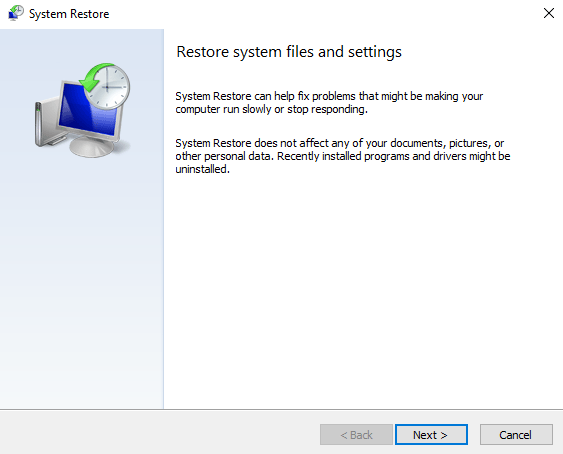
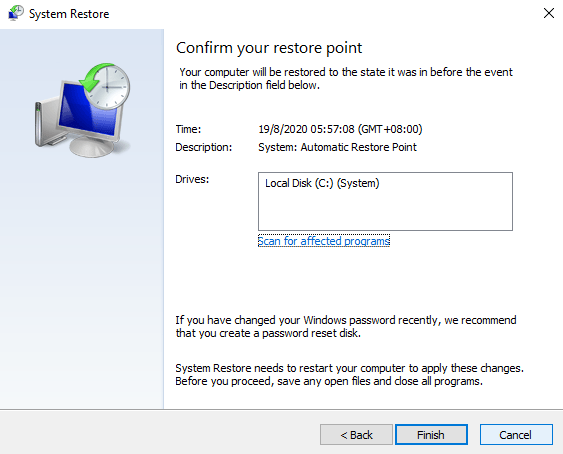
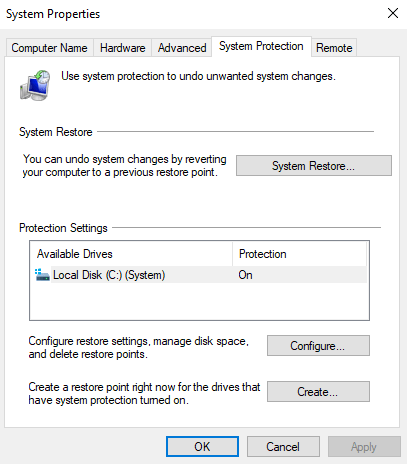
System Restore. A system restore is a feature that allows the user to revert their computer’s state at a point in time where the system was error-free. It does not affect personal files, changes in documents, and new files while it reverses system changes. To do a system restore:

  1. Open Start.
  2. Type “create a restore point” on the search box.
  3. Click the top result to open System Properties.
  4. Click on System Restore.

5. Click Next.

6. Select the restore point you want to use on your computer and click Next.

7. Click the Finish button.

Reinstall Windows. This is the last resort if none of the solutions above worked. Reinstalling a clean Windows operating system removes all the system software and drivers, and resets all settings.

Coming across BSOD does not mean that your computer is marked as dead and useless. Instead, it is simply a notification message from Windows that there is a serious problem that needs your attention prior to using your computer normally. Instead of a frown, turn that sad face of yours upside down. Solutions are at hand now.

Desktop vs Laptop: Find Out Which One Is Best for Your Remote Work

Every one of us has different perceptions when it comes to working from home or doing remote work. Would it be wise to spend a lot to establish a work from home setup? Would your workstation be one that can be carried wherever and whenever you go? Would your PC be one that is based on performance over quality? To put it simply, for most of us, the question always stems out of whether to buy a desktop or a laptop.

To help you decide, given below are criteria to take into consideration when setting up your home office, which will also differentiate a desktop from a laptop consequently:

Budget-friendliness. A desktop’s price comes in as cheaper option compared to that of a laptop. Laptops cost more to manufacture, produce, and incorporate. Simply imagine the already medium-sized computer parts being assembled into an even smaller and more compact portable device.

Portability. The very design of a laptop screams and oozes portability. On the other hand, desktop can also be moved from one place to another (apparently requiring your cardio and strength conditioning), but is generally designed to be in one location. If you are a digital nomad, it is undeniable that you would opt for a laptop. In contrary, being a stay-at-home freelancer may make desktop more suitable for you.

Upgradability. Normally, laptops are boxed components that are not 100% upgradable. You are fortunate if you could upgrade both the storage and its random-access memory (RAM). But then, desktop components can be upgraded if so pleased and can go with the flow of the ever-moving technological advancements.  If you know how to tinker with a desktop, you can technically change all its components.

Power Consumption. A desktop needs more power to operate as its unit and monitor display need separate power supplies. Alternatively, a laptop, which has an independent power in a form of a battery pack, can go hours without being plugged into a power source. Power fluctuations will render the desktop vulnerable as unsaved work will be lost.

Performance and Repair. Due to the nature of a laptop being a minimized version of a desktop, the desktop processors tend to be more powerful than that of a laptop. Although there is no science to explain it, laptops tend to slow down over time compared to a desktop. Also, laptops have a limited space in its bezel, so adding another internal drive is not possible. However, one can completely replace the internal drive with one that has more storage. Laptops are also difficult to open if it needs servicing compared to a desktop that has its components easily accessible.

Bear in mind that the given points are simply guidelines. Every remote worker has his or her own preference in terms of budget, convenience, efficiency, and maintenance relative to their workstation. Make a decision by considering your current situation, what you mostly need with your remote work, and the future issues that you may encounter regardless of the unit you decide to buy.

Specifications to Consider When Buying a PC for Remote Work

Specifications to Consider When Buying a PC for Remote Work

Success in remote work is not reliant on your work performance alone. Take note that you would not be able to deliver high quality output without the help of your PC. Your computer is what enables you to communicate and coordinate with your clients. Furthermore, all of the applications required to carry out your work are accessible through it. Hence, it is undeniable that your PC is a critical component of your virtual work.

In choosing a computer, you must consider the usual activities you handle as a virtual assistant. That being said, the following categorized specifications would help:

For Administrative Tasks

Examples of administrative tasks are data entry, calendar management, e-mail management, and documents management among others. For effective execution of the said activities, your PC specifications should not be less than the following:

  • Intel Core i3 or AMD Ryzen 3
  • 500GB to 1TB hard drive or 128GB SSD
  • 4GB to 8GB RAM
  • Built-in Graphics Card or Dedicated Graphics
  • Full HD (1080p) screen

Note: Intel Celeron, Pentium and Atom, and AMD A-series and Athlon are less powerful than Core i and Ryzen chips.

For Non-Administrative Tasks

Non-administrative tasks include technical work, such as website development and graphic design. You could say that these activities require more advanced PC to use. Relatively, the following specifications are ideal to consider:

  • Intel Core i5 and i7 or Ryzen 7 and 9 (AMD)
  • 256GB to 512GB SSD or combination of SSD and mechanical hard drive
  • 16GB of RAM or higher
  • Dedicated High-End GPU Graphics Card

With the given specifications for every category of remote work activities, you will definitely have no issue with your productivity or efficiency. Be reminded that without considering the performance of your PC, you will suffer from drawbacks, such as delayed submission of work, frequent downtime, and tons of interruptions due to hardware failure.

Simply follow the provided guidelines in selecting your new PC, and you will certainly reap the benefits of seamless remote work experience.

Punctuality How Important It Is for a Remote Worker

Punctuality: How Important It Is for a Remote Worker

Have you ever been late at work? Do you find yourself frequently missing your kick-off meetings? Probably, it is time to reflect if these happen to you, for punctuality is an essential trait of a reliable remote worker. In other words, if you fail to possess this habit, it may also cost your job.

There are various reasons why punctuality is something employers look for in a virtual assistant. It may be trivial for some, especially to those, who highly favor flexible schedules. However, it is not the case for the rest, who value professionalism, which encompasses one’s careful consideration of work schedule.

To begin with, punctuality is a very important characteristic of a remote worker for it shows how committed you are to your work. Simply think of it in this way: were you ever late for an appointment with your wife or husband? There is a possibility that you failed to show up on time, but it costed you big time, either by an argument or long-term guilt. This only implies that you will never be late to something that is of import to you.

Employers believe that a punctual person is someone they could rely on. Obviously, for instance, your shift starts at 8:00 A.M., so it is quite anticipated that tasks, either urgent or not, will be available for taking as the clock strikes at the said time. If you are often tardy, your employer would not even consider you for projects, given he or she would not be certain if you would show up early or the contrary. Somehow, it is a gamble for him or her to depend on you all the time.

Moreover, punctuality shows that you are someone, who cares about your co-workers. If you are on time, you would not be delaying the tasks, which may be needed by your team members before they could proceed with their part of the project. Being punctual is not limited to going to work on time. Instead, it could also cover instances, wherein you ensure that you do not miss the deadlines of your activities.

Professionalism is greatly conveyed by punctuality as a remote worker. It shows that despite the convenience of being at home, you respect the rules set upon by your employer. This includes showing up on time based on the schedule agreed upon by both parties.

Being punctual is not difficult, only if you put your mind into it. Be reminded that as a virtual assistant, you have fewer reasons to be late. Your workspace could only be a few steps from your bedroom. You do not have to battle traffic and pollution outside. As a virtual worker, you are often not required to don a professional attire, which may take much of your preparation time. Plus, it is not too time-consuming to open up your PC and set up the materials you need for the day.

Be reminded that despite working home-based, you should still maintain your professionalism in every aspect possible. Never let comfort ruin your reputation as a steadfast virtual assistant.